Vigenère Square Explained: How to Read and Use It
A Vigenère square is a grid of shifted alphabets used to perform Vigenère encryption and decryption by hand. It is also called a Vigenère table, Vigenère tableau, or tabula recta.
The grid can look complicated at first because it contains 26 versions of the alphabet. Its logic is much simpler than its appearance suggests. Each row is just the alphabet shifted one position farther than the row above it.
In the standard English version, the row beginning with A applies no shift, the row beginning with B applies a shift of one, and the process continues through Z, which represents a shift of 25.
That makes the square a lookup table for the same operation performed mathematically by the Vigenère cipher. If you would rather work with a message directly, the Vigenère Cipher Decoder and Encoder performs the operation automatically. The purpose here is to understand exactly what the table is doing.
What the Vigenère square actually represents
Start with the ordinary alphabet:
Move the first letter to the end and you get the next shifted alphabet:
Shift once more:
Continue until every possible shift has been represented. With a 26-letter alphabet, there are 26 rows.
Viewed this way, the square is not a collection of unrelated substitutions. It is an organized set of all 26 Caesar-style shifts of the alphabet.
The Vigenère key determines which of those shifts is used for each position in a message. If the current key letter is L, for example, the corresponding shift is 11.
This relationship between a key letter and a shift is central to how the Vigenère cipher works .
The complete tabula recta
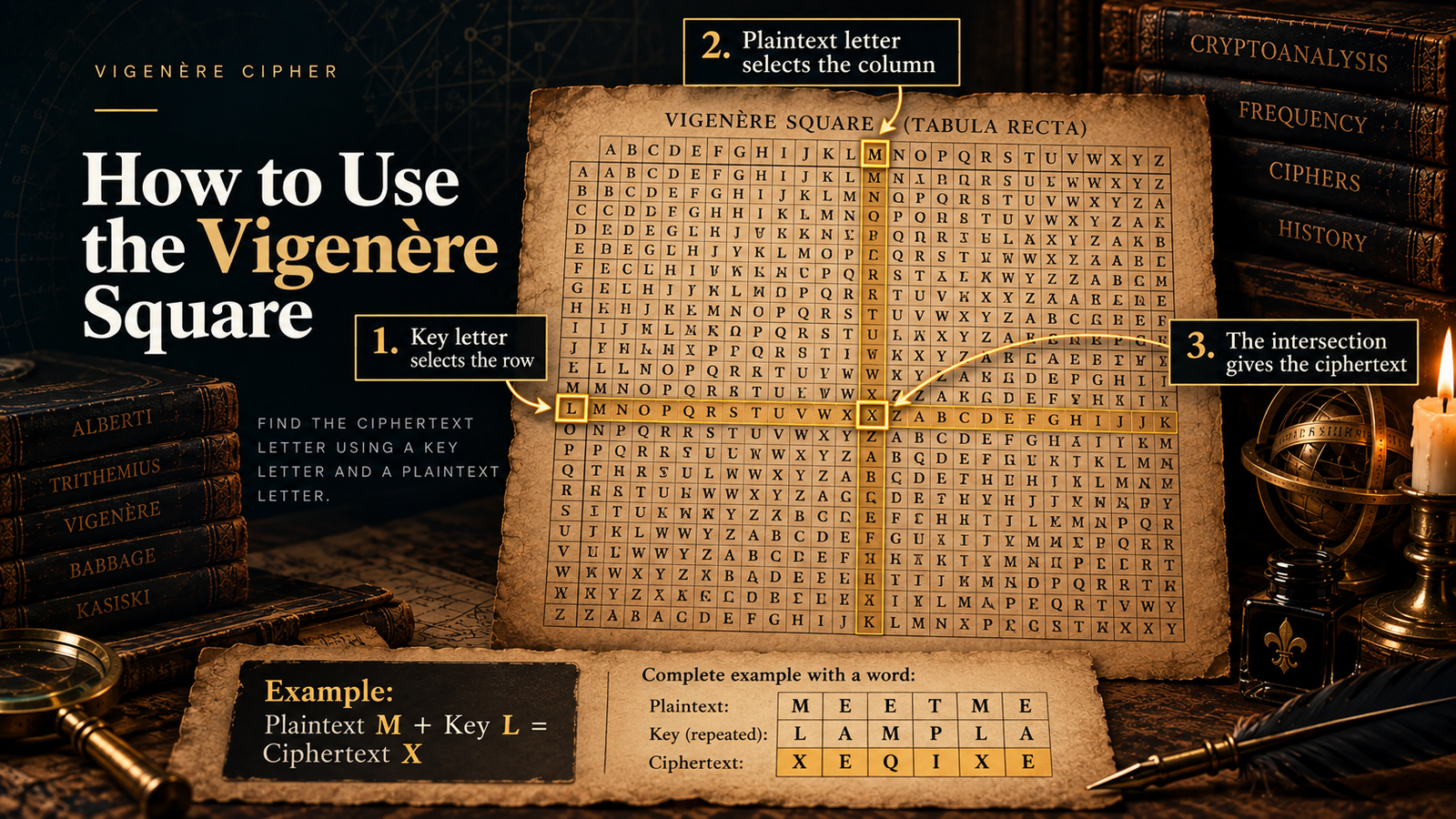
The standard square below uses the alphabet A–Z. The letters across the top identify columns, while the letters on the left identify rows.
For the convention used in this article, the key letter selects the row and the plaintext letter selects the column during encryption.
The important pattern is easier to see in the first few rows. Moving one row downward increases the shift by one. Moving across a row progresses through that shifted alphabet.
Once you understand that pattern, you do not need to memorize any cells in the square.
How to find one encrypted letter
Suppose the plaintext letter is M and the corresponding key letter is L.
Using the convention above:
Therefore:
There is a useful way to verify this without the table.
If A=0, B=1, and so on, then M=12 and L=11.
The table lookup and the numerical calculation give the same result because they are two representations of the same operation.
How to encrypt a message with the square
A complete message requires one additional step: the key must be aligned with the plaintext.
Take the plaintext:
and the key:
The key is shorter than the message, so the traditional repeating-key Vigenère method starts it again from the beginning:
Now perform one square lookup for each column.
| Position | Plaintext | Key | Shift | Ciphertext |
|---|---|---|---|---|
| 1 | M | L | 11 | X |
| 2 | E | A | 0 | E |
| 3 | E | M | 12 | Q |
| 4 | T | P | 15 | I |
| 5 | M | L | 11 | X |
| 6 | E | A | 0 | E |
The resulting ciphertext is:
Notice what happens to the two early E characters. The first is paired with A and remains E. The next is paired with M and becomes Q.
The plaintext letter itself did not determine the output. The plaintext and key letter together determined it. This changing substitution is why Vigenère is polyalphabetic rather than a single fixed substitution.
The complete message-level procedure, including key alignment and worked calculations, is covered separately in How to Encrypt and Decrypt With the Vigenère Cipher .
How to decrypt with the Vigenère square
Decryption uses the same square, but the lookup changes because the ciphertext is now known and the plaintext is the value you are trying to recover.
Suppose the first ciphertext letter is X and the key letter is L.
So:
Continue in the same way for each ciphertext-key pair and the example above reverses cleanly:
A common beginner mistake is to treat decryption as another ordinary intersection lookup. During encryption, plaintext and key identify the cell containing the ciphertext. During decryption, the key identifies a row, the ciphertext identifies a cell within that row, and the column heading reveals the plaintext.
Why some Vigenère squares appear to reverse the row and column
One source may tell you to place the key on the left and the plaintext across the top. Another may tell you to do the opposite.
For the ordinary Vigenère square shown above, both conventions produce the same encryption result.
The reason is mathematical. Each cell represents the sum of two letter values modulo 26:
Addition can be reversed without changing the result:
For example, plaintext F and key K lead to P whether you locate row K and column F or row F and column K.
This symmetry explains why apparently different instructions can both be correct.
What matters is that you understand how the particular table is labeled. Do not blindly transfer instructions from one diagram to another, especially when working with a modified alphabet or a related cipher whose table may not behave in exactly the same way.
The square is really modular arithmetic written out
The most useful insight about the Vigenère square is that it does not perform a separate kind of encryption. It makes the arithmetic visible.
Number the alphabet from 0 to 25:
Encryption is:
where:
Consider plaintext T with key P.
In the square, row P and column T intersect at I.
The apparent wrap from the end of the alphabet back to the beginning is simply the visible effect of arithmetic modulo 26.
Decryption reverses the calculation:
Understanding this equivalence is useful because it removes much of the mystery from the table. The square is convenient for hand work; the arithmetic is usually more convenient for software.
Why A represents a shift of zero
The first row is sometimes a source of confusion.
If the key letter is A, the plaintext does not change:
That is because A represents the numerical value 0, not 1.
The row beginning with B is the first actual shift:
Treating A as a shift of one moves every result by one position and produces an incompatible ciphertext. This is one of the easiest off-by-one errors to make when constructing a Vigenère table manually or implementing the cipher in code.
Spaces and punctuation are not part of the standard 26-letter square
The traditional table above contains only the letters A–Z. It therefore does not tell you what to do with spaces, punctuation, digits, accented characters, or other symbols.
A manual convention might remove non-letter characters before encryption:
Another implementation might preserve spaces and punctuation in their original positions while applying the key only to alphabetic characters.
Those choices do not change the basic Vigenère operation, but they can change key alignment if two systems handle non-letter characters differently.
For example, if one program advances the key when it encounters a space and another does not, the two implementations will stop producing the same ciphertext after that point.
When reproducing ciphertext from a book, challenge, website, or piece of software, check its alphabet and character-handling rules before assuming that your table calculation is wrong.
Five mistakes that cause wrong Vigenère table results
Most errors with the square are procedural rather than mathematical. The table itself is deterministic: the same correctly aligned plaintext and key always produce the same result.
| Mistake | What goes wrong | What to check |
|---|---|---|
| Counting A as shift 1 | Every substitution is displaced by one. | Use A=0 through Z=25. |
| Misaligning the repeated key | Correct lookups are performed with the wrong key letters. | Write plaintext and keystream on aligned lines first. |
| Using encryption logic for decryption | The ciphertext is combined with the key instead of reversed. | During decryption, find the ciphertext within the key row and read the column heading. |
| Handling spaces differently | The key can move out of alignment partway through the message. | Confirm whether non-letters consume a key position. |
| Ignoring the table labels | A different row/column convention may appear contradictory. | Identify what the top and left labels represent before starting. |
Writing the plaintext, repeated key, and result on separate aligned lines prevents several of these errors at once.
Vigenère square and tabula recta: are they the same thing?
In modern explanations of the standard Vigenère cipher, the terms Vigenère square and tabula recta are commonly used for the same shifted-alphabet grid.
Historically, however, the table itself predates the cipher now called Vigenère. Johannes Trithemius described a tabula recta in Polygraphia, which was published in the early sixteenth century. Later polyalphabetic systems used shifted alphabets in different ways.
That distinction matters because the table is a cryptographic structure, not a cipher by itself. Instructions for choosing rows and columns, generating the key stream, and reversing the transformation determine how the structure is used.
The Vigenère cipher uses the table according to its keying rule. Other historical systems can use related alphabet tables differently.
When the square is useful and when it is not
For manual encryption, the square removes the need to convert letters into numbers and calculate modular sums for every character. You can work directly with letters.
It is also useful for learning because the rows make the changing shifts visible. You can see immediately that a key letter selects one of many substitution alphabets rather than one fixed alphabet being used throughout the message.
For software, constructing a literal 26-by-26 table is usually unnecessary. The same output can be calculated directly from letter values.
Neither method is more “correct.” They are different representations of the same standard operation.
The simplest way to remember the Vigenère square
You do not need to memorize 676 cells.
Remember three ideas instead.
First, each row is the alphabet shifted one position farther than the previous row.
Second, the key letter determines the shift used at that position.
Third, the cell at the plaintext-key intersection is simply the result of adding those two letter values modulo 26.
Once those relationships are clear, the Vigenère square stops being a large table to memorize and becomes what it really is: a visual map of the cipher’s letter arithmetic.
If the square itself now makes sense and you want to follow the entire algorithm from key preparation through the final ciphertext, continue with the Vigenère encryption and decryption process .